Your BLADE Outboard is equipped with an intuitive LED indicator system that provides real-time feedback about the status of your motor, battery, speed, and more. The LED indicators help you monitor key operational parameters and alert you to any potential issues. Below is an overview of the various LED indicator lights, their meanings, and what you should do if they appear.
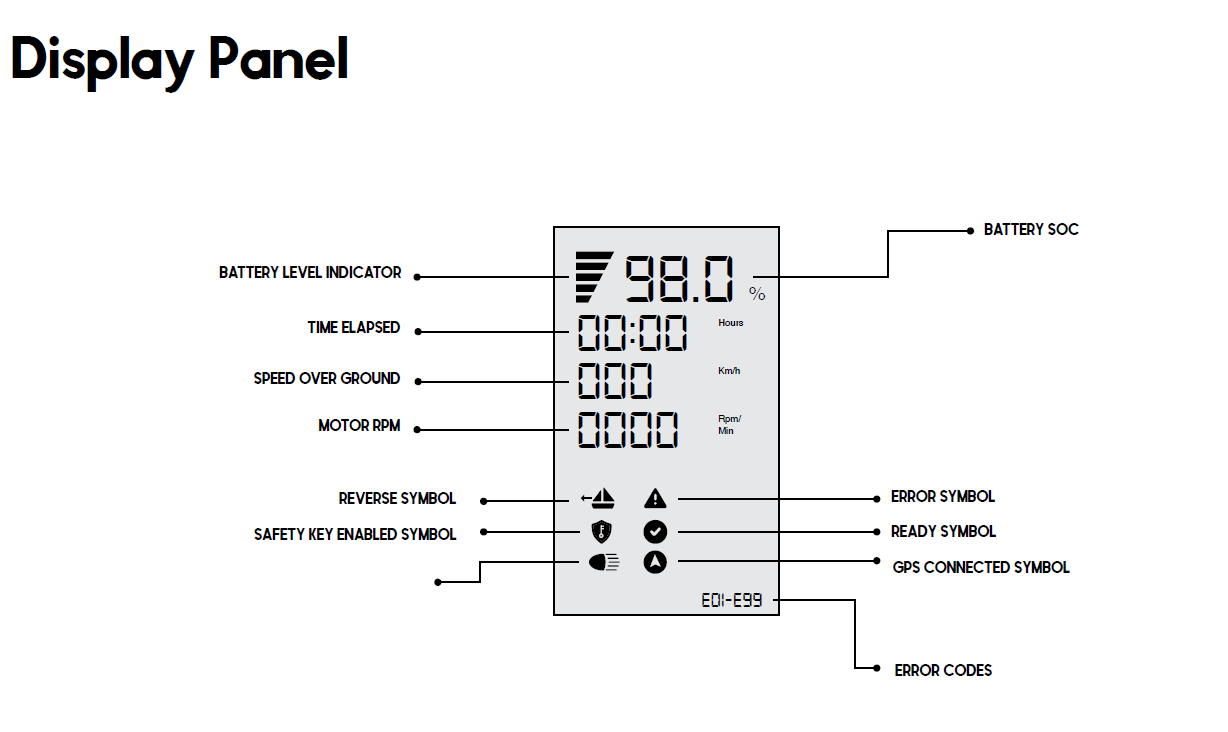
1. Battery Level Indicator
- Description: The battery level indicator shows the current charge level of your outboard’s battery.
- Visual: A series of bars or a color gradient (typically green to red) will appear on the display.
- What to Do:
- Green: Sufficient battery charge for operation.
- Yellow/Orange: Battery level is getting low—consider charging soon.
- Red: Battery is critically low—recharge immediately to avoid losing power during operation.
2. Time Elapsed Indicator
- Description: This indicator shows the amount of time that has passed since the motor was last started or the session began.
- Visual: A timer icon or numerical value may be displayed.
- What to Do:
- Monitor the time elapsed to help you gauge battery usage and motor performance during extended use.
3. Speed Over Ground Indicator
- Description: This shows the speed at which the boat is moving across the ground (not through the water).
- Visual: The speed is usually displayed as a numerical value (e.g., in kilometers per hour or miles per hour).
- What to Do:
- Normal: Speed displayed is within expected limits for the motor’s power.
- Check the Speed: If the speed seems too high or low for conditions, check for any potential issues with the motor or propeller.
4. Motor RPM Indicator
- Description: The RPM indicator provides real-time information about the revolutions per minute (RPM) of the motor.
- Visual: The RPM is displayed numerically or through a range of colors, often with a tachometer-like symbol.
- What to Do:
- Normal RPM: If the RPM is within the expected range, the motor is operating normally.
- High RPM: If the motor is operating at higher-than-normal RPM, consider reducing power to avoid damaging the motor.
- Low RPM: Low RPM can indicate a performance issue, which may need troubleshooting.
5. Reverse Symbol Indicator
- Description: The reverse symbol indicator lights up when the outboard is in reverse gear.
- Visual: The reverse indicator is usually a small symbol of a backward arrow.
- What to Do:
- Reverse Active: Ensure that the motor is in the reverse position as required. Always double-check before moving the boat in reverse to avoid unexpected behavior.
6. Safety Key Symbol
- Description: This symbol indicates whether the safety key is properly inserted and the outboard is ready to operate.
- Visual: A key icon appears on the display.
- What to Do:
- On: The safety key is inserted, and the motor is operational.
- Off: The safety key is not detected. Ensure the key is properly inserted to enable motor operation.
7. Error Symbol
- Description: This symbol alerts you to a malfunction or operational error within the motor.
- Visual: An exclamation mark or wrench icon typically indicates an error.
- What to Do:
- Error Detected: If the error symbol appears, immediately check for any malfunction codes or refer to the error code section (below) for a specific error code.
- Action: Follow troubleshooting steps or contact customer support for assistance.
8. Ready Symbol
- Description: The ready symbol lights up when the motor is fully operational and ready for use.
- Visual: A green checkmark or “Ready” indicator appears.
- What to Do:
- Ready for Operation: Proceed with using the motor when the symbol is visible.
- Not Ready: If the symbol is not present, ensure the motor is properly connected, and the battery is fully charged.
9. GPS Symbol
- Description: The GPS symbol indicates that the outboard is actively receiving GPS signals for positioning and tracking.
- Visual: A satellite or GPS-related icon appears on the display.
- What to Do:
- On: The GPS system is functioning and tracking your location.
- Off: The GPS system may not be receiving a signal. Check for any obstructions or issues with the GPS antenna, and allow time for a signal to be acquired.
10. Error Code
- Description: The error code displays specific codes for various operational issues. Each code corresponds to a unique error.
- Visual: A numeric or alphanumeric code is shown on the display.
- What to Do:
- Identify the Code: Refer to the motor’s user manual or troubleshooting guide to identify the specific error code and take the necessary corrective actions.
- Consult Support: If you’re unable to resolve the issue on your own, contact BLADE Outboards customer support with the error code for further assistance.
Was this article helpful?
That’s Great!
Thank you for your feedback
Sorry! We couldn't be helpful
Thank you for your feedback
Feedback sent
We appreciate your effort and will try to fix the article